PdfPig 0.1.13-alpha-20251124-ce563
PdfPig


![Build and test [MacOS]](https://github.com/UglyToad/PdfPig/actions/workflows/build_and_test_macos.yml/badge.svg)
PdfPig supports reading text and content from PDF files. It also supports basic PDF file creation.
Installation
The package is available via the releases tab or from Nuget:
https://www.nuget.org/packages/PdfPig/
Or from the package manager console:
> Install-Package PdfPig
While the version is below 1.0.0 minor versions will change the public API without warning (SemVer will not be followed until 1.0.0 is reached).
Get Started
See the wiki for more examples
Reading text from a PDF
The simplest usage at this stage is to open a document, reading the words from every page:
// using UglyToad.PdfPig.DocumentLayoutAnalysis.TextExtractor;
// using UglyToad.PdfPig.DocumentLayoutAnalysis.WordExtractor;
using (PdfDocument document = PdfDocument.Open(@"C:\Documents\document.pdf"))
{
    foreach (Page page in document.GetPages())
    {
        string text = ContentOrderTextExtractor.GetText(page);
        IEnumerable<Word> words = page.GetWords(NearestNeighbourWordExtractor.Instance);
    }
}
You should not use page.Text directly, unless you know what you're doing. The Text property preserves the internal content order which is rarely ever the text in the order you want.
These layout analysis tools should get you the text you want in most cases.
Create PDF Document
To create documents use the class PdfDocumentBuilder. The Standard 14 fonts provide a quick way to get started:
PdfDocumentBuilder builder = new PdfDocumentBuilder();

PdfPageBuilder page = builder.AddPage(PageSize.A4);

// Fonts must be registered with the document builder prior to use to prevent duplication.
PdfDocumentBuilder.AddedFont font = builder.AddStandard14Font(Standard14Font.Helvetica);

page.AddText("Hello World!", 12, new PdfPoint(25, 700), font);

byte[] documentBytes = builder.Build();

File.WriteAllBytes(@"C:\git\newPdf.pdf", documentBytes);
The output is a 1 page PDF document with the text "Hello World!" in Helvetica near the top of the page:
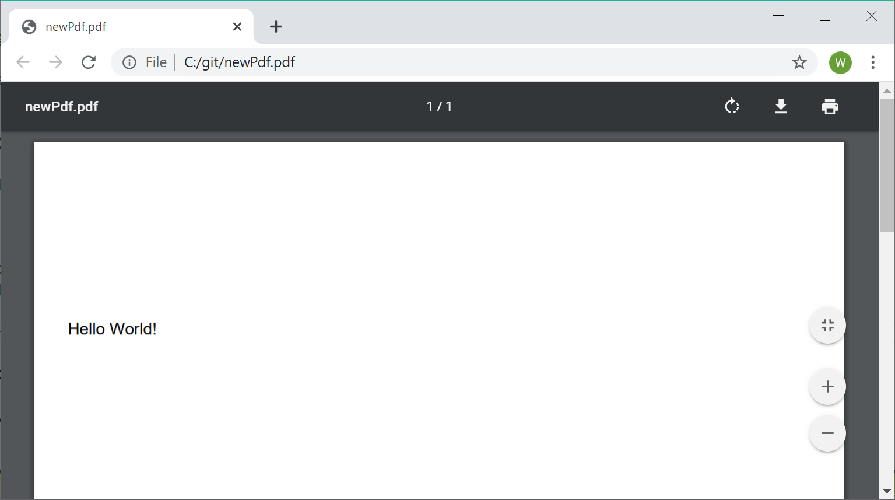
Each font must be registered with the PdfDocumentBuilder prior to use enable pages to share the font resources. Only Standard 14 fonts and TrueType fonts (.ttf) are supported.
Document creation supports very limited changes to existing PDF documents. However it does not support any of the following:
- Editing forms
- Copying or changing annotations, metadata or document structure data
- Adding or removing text with existing fonts
Advanced Document Extraction
In this example a more advanced document extraction is performed. PdfDocumentBuilder is used to create a copy of the pdf with debug information (bounding boxes and reading order) added.
//using UglyToad.PdfPig;
//using UglyToad.PdfPig.DocumentLayoutAnalysis.PageSegmenter;
//using UglyToad.PdfPig.DocumentLayoutAnalysis.ReadingOrderDetector;
//using UglyToad.PdfPig.DocumentLayoutAnalysis.WordExtractor;
//using UglyToad.PdfPig.Fonts.Standard14Fonts;
//using UglyToad.PdfPig.Writer;


var sourcePdfPath = "";
var outputPath = "";
var pageNumber = 1;
using (var document = PdfDocument.Open(sourcePdfPath))
{
    var builder = new PdfDocumentBuilder { };
    PdfDocumentBuilder.AddedFont font = builder.AddStandard14Font(Standard14Font.Helvetica);
    var pageBuilder = builder.AddPage(document, pageNumber);
    pageBuilder.SetStrokeColor(0, 255, 0);
    var page = document.GetPage(pageNumber);

    var letters = page.Letters; // no preprocessing

    // 1. Extract words
    var wordExtractor = NearestNeighbourWordExtractor.Instance;

    var words = wordExtractor.GetWords(letters);

    // 2. Segment page
    var pageSegmenter = DocstrumBoundingBoxes.Instance;

    var textBlocks = pageSegmenter.GetBlocks(words);

    // 3. Postprocessing
    var readingOrder = UnsupervisedReadingOrderDetector.Instance;
    var orderedTextBlocks = readingOrder.Get(textBlocks);

    // 4. Add debug info - Bounding boxes and reading order
    foreach (var block in orderedTextBlocks)
    {
        var bbox = block.BoundingBox;
        pageBuilder.DrawRectangle(bbox.BottomLeft, bbox.Width, bbox.Height);
        pageBuilder.AddText(block.ReadingOrder.ToString(), 8, bbox.TopLeft, font);
    }

    // 5. Write result to a file
    byte[] fileBytes = builder.Build();
    File.WriteAllBytes(outputPath, fileBytes); // save to file
}

See Document Layout Analysis for more information on advanced document analysing.
See Export for more advanced tooling to analyse document layouts.
Usage
PdfDocument
The PdfDocument class provides access to the contents of a document loaded either from file or passed in as bytes. To open from a file use the PdfDocument.Open static method:
using UglyToad.PdfPig;
using UglyToad.PdfPig.Content;

using (PdfDocument document = PdfDocument.Open(@"C:\my-file.pdf"))
{
	int pageCount = document.NumberOfPages;

	// Page number starts from 1, not 0.
	Page page = document.GetPage(1);

	decimal widthInPoints = page.Width;
	decimal heightInPoints = page.Height;

	string text = page.Text;
}
PdfDocument should only be used in a using statement since it implements IDisposable (unless the consumer disposes of it elsewhere).
Encrypted documents can be opened by PdfPig. To provide an owner or user password provide the optional ParsingOptions when calling Open with the Password property defined. For example:
using (PdfDocument document = PdfDocument.Open(@"C:\my-file.pdf", new ParsingOptions { Password = "password here" }))
You can also provide a list of passwords to try:
using (PdfDocument document = PdfDocument.Open(@"C:\file.pdf", new ParsingOptions
{
	Passwords = new List<string> { "One", "Two" }
}))
The document contains the version of the PDF specification it complies with, accessed by document.Version:
decimal version = document.Version;
Document Creation
The PdfDocumentBuilder creates a new document with no pages or content.
For text content, a font must be registered with the builder. This library supports Standard 14 fonts provided by Adobe by default and TrueType format fonts.
To add a Standard 14 font use:
public AddedFont AddStandard14Font(Standard14Font type)
Or for a TrueType font use:
AddedFont AddTrueTypeFont(IReadOnlyList<byte> fontFileBytes)
Passing in the bytes of a TrueType file (.ttf). You can check the suitability of a TrueType file for embedding in a PDF document using:
bool CanUseTrueTypeFont(IReadOnlyList<byte> fontFileBytes, out IReadOnlyList<string> reasons)
Which provides a list of reasons why the font cannot be used if the check fails. You should check the license for a TrueType font prior to use, since the compressed font file is embedded in, and distributed with, the resultant document.
The AddedFont class represents a key to the font stored on the document builder. This must be provided when adding text content to pages. To add a page to a document use:
PdfPageBuilder AddPage(PageSize size, bool isPortrait = true)
This creates a new PdfPageBuilder with the specified size. The first added page is page number 1, then 2, then 3, etc. The page builder supports adding text, drawing lines and rectangles and measuring the size of text prior to drawing.
To draw lines and rectangles use the methods:
void DrawLine(PdfPoint from, PdfPoint to, decimal lineWidth = 1)
void DrawRectangle(PdfPoint position, decimal width, decimal height, decimal lineWidth = 1)
The line width can be varied and defaults to 1. Rectangles are unfilled and the fill color cannot be changed at present.
To write text to the page you must have a reference to an AddedFont from the methods on PdfDocumentBuilder as described above. You can then draw the text to the page using:
IReadOnlyList<Letter> AddText(string text, decimal fontSize, PdfPoint position, PdfDocumentBuilder.AddedFont font)
Where position is the baseline of the text to draw. Currently only ASCII text is supported. You can also measure the resulting size of text prior to drawing using the method:
IReadOnlyList<Letter> MeasureText(string text, decimal fontSize, PdfPoint position, PdfDocumentBuilder.AddedFont font)
Which does not change the state of the page, unlike AddText.
Changing the RGB color of text, lines and rectangles is supported using:
void SetStrokeColor(byte r, byte g, byte b)
void SetTextAndFillColor(byte r, byte g, byte b)
Which take RGB values between 0 and 255. The color will remain active for all operations called after these methods until reset is called using:
void ResetColor()
Which resets the color for stroke, fill and text drawing to black.
Document Information
The PdfDocument provides access to the document metadata as DocumentInformation defined in the PDF file. These tend not to be provided therefore most of these entries will be null:
PdfDocument document = PdfDocument.Open(fileName);

// The name of the program used to convert this document to PDF.
string producer = document.Information.Producer;

// The title given to the document
string title = document.Information.Title;
// etc...
Document Structure
The PdfDocument has a Structure member:
UglyToad.PdfPig.Structure structure = document.Structure;
This provides access to tokenized PDF document content:
Catalog catalog = structure.Catalog;
DictionaryToken pagesDictionary = catalog.PagesDictionary;
The pages dictionary is the root of the pages tree within a PDF document. The structure also exposes a GetObject(IndirectReference reference) method which allows random access to any object in the PDF as long as its identifier number is known. This is an identifier of the form 69 0 R where 69 is the object number and 0 is the generation.
Page
The Page contains the page width and height in points as well as mapping to the PageSize enum:
PageSize size = Page.Size;

bool isA4 = size == PageSize.A4;
Page provides access to the text of the page but you should use ContentOrderTextExtractor or alternatives if indexing the text, e.g. for RAG/LLMs:
string text = page.Text;
There is a method which provides access to the words. The default method uses basic heuristics. For advanced cases, You can also implement your own IWordExtractor or use the NearestNeighbourWordExtractor:
IEnumerable<Word> words = page.GetWords();
You can also access the raw operations used in the page's content stream for drawing graphics and content on the page:
IReadOnlyList<IGraphicsStateOperation> operations = page.Operations;
Consult the PDF specification for the meaning of individual operators.
There is also an API for retrieving the PDF image objects per page:
IEnumerable<XObjectImage> images = page.GetImages();
Please read the wiki on Images.
Letter
Due to the way a PDF is structured internally the page text may not be a readable representation of the text as it appears in the document. Since PDF is a presentation format, text can be drawn in any order, not necessarily reading order. This means spaces may be missing or words may be in unexpected positions in the text.
To help users resolve actual text order on the page, the Page file provides access to a list of the letters:
IReadOnlyList<Letter> letters = page.Letters;
These letters contain:
- The text of the letter:
letter.Value. - The location of the lower left of the letter:
letter.Location. - The width of the letter:
letter.Width. - The font size in unscaled relative text units (these sizes are internal to the PDF and do not correspond to sizes in pixels, points or other units):
letter.FontSize. - The name of the font used to render the letter if available:
letter.FontName. - A rectangle which is the smallest rectangle that completely contains the visible region of the letter/glyph:
letter.GlyphRectangle. - The points at the start and end of the baseline
StartBaseLineandEndBaseLinewhich indicate if the letter is rotated. TheTextDirectionindicates if this is a commonly used rotation or a custom rotation.
Letter position is measured in PDF coordinates where the origin is the lower left corner of the page. Therefore a higher Y value means closer to the top of the page.
Annotations
Retrieving annotations on each page is provided using the method:
page.GetAnnotations()
This call is not cached and the document must not have been disposed prior to use. Annotations cannot be edited.
Bookmarks
The bookmarks (outlines) of a document may be retrieved at the document level:
bool hasBookmarks = document.TryGetBookmarks(out Bookmarks bookmarks);
This will return false if the document does not define any bookmarks.
Forms
Form fields for interactive forms (AcroForms) can be retrieved using:
bool hasForm = document.TryGetForm(out AcroForm form);
This will return false if the document does not contain a form.
The fields can be accessed using the AcroForm's Fields property. Since the form is defined at the document level this will return fields from all pages in the document. Fields are of the types defined by the enum AcroFieldType, for example PushButton, Checkbox, Text, etc.
Please note the forms are readonly and values cannot be changed or added using PdfPig.
Hyperlinks
A page has a method to extract hyperlinks (annotations of link type):
IReadOnlyList<UglyToad.PdfPig.Content.Hyperlink> hyperlinks = page.GetHyperlinks();
Hyperlinks cannot be added or edited when building documents.
TrueType
The classes used to work with TrueType fonts in the PDF file are available for public consumption. Given an input file:
using UglyToad.PdfPig.Fonts.TrueType;
using UglyToad.PdfPig.Fonts.TrueType.Parser;

byte[] fontBytes = System.IO.File.ReadAllBytes(@"C:\font.ttf");
TrueTypeDataBytes input = new TrueTypeDataBytes(fontBytes);
TrueTypeFont font = TrueTypeFontParser.Parse(input);
The parsed font can then be inspected.
Embedded Files
PDF files may contain other files entirely embedded inside them for document annotations. The list of embedded files and their byte content may be accessed:
if (document.Advanced.TryGetEmbeddedFiles(out IReadOnlyList<EmbeddedFile> files)
    && files.Count > 0)
{
    var firstFile = files[0];
    string name = firstFile.Name;
    IReadOnlyList<byte> bytes = firstFile.Bytes;
}
Merging
You can merge 2 or more existing PDF files using the PdfMerger class:
var resultFileBytes = PdfMerger.Merge(filePath1, filePath2);
File.WriteAllBytes(@"C:\pdfs\outputfilename.pdf", resultFileBytes);
Wiki
Check out our wiki for more examples and detailed guides on the API.
Issues
Please do file an issue if you encounter a bug. See our issue policy and contributing guide for details.
API Reference
If you wish to generate doxygen documentation, run doxygen doxygen-docs and open docs/doxygen/html/index.html.
Credit
This project started as an effort to port PDFBox to C#. This project wouldn't be possible without the work done by the PDFBox team and the Apache Foundation.