Serilog.Sinks.Console 6.0.1-dev-00953
Serilog.Sinks.Console 



A Serilog sink that writes log events to the Windows Console or an ANSI terminal via standard output. Coloring and custom themes are supported, including ANSI 256-color themes on macOS, Linux and Windows 10. The default output is plain text; JSON formatting can be plugged in using a package such as Serilog.Formatting.Compact.
Getting started
To use the console sink, first install the NuGet package:
dotnet add package Serilog.Sinks.Console
Then enable the sink using WriteTo.Console():
Log.Logger = new LoggerConfiguration()
    .WriteTo.Console()
    .CreateLogger();

Log.Information("Hello, world!");
Log events will be printed to STDOUT:
[12:50:51 INF] Hello, world!
Themes
The sink will colorize output by default:
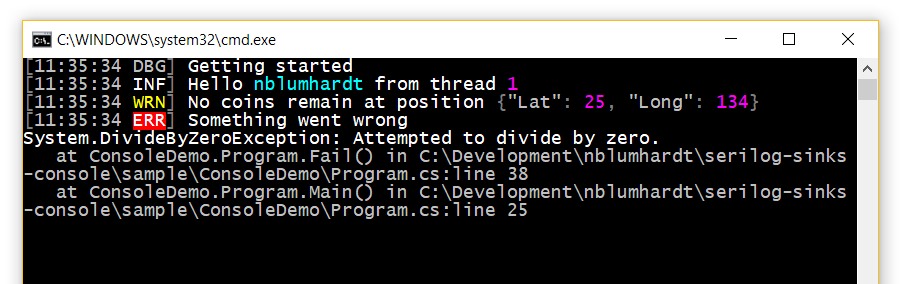
Themes can be specified when configuring the sink:
.WriteTo.Console(theme: AnsiConsoleTheme.Code)
The following built-in themes are available:
ConsoleTheme.None- no stylingSystemConsoleTheme.Literate- styled to replicate Serilog.Sinks.Literate, using theSystem.Consolecoloring modes supported on all Windows/.NET targets; this is the default when no theme is specifiedSystemConsoleTheme.Grayscale- a theme using only shades of gray, white, and blackAnsiConsoleTheme.Literate- an ANSI 256-color version of the "literate" themeAnsiConsoleTheme.Grayscale- an ANSI 256-color version of the "grayscale" themeAnsiConsoleTheme.Code- an ANSI 256-color Visual Studio Code-inspired themeAnsiConsoleTheme.Sixteen- an ANSI 16-color theme that works well with both light and dark backgrounds
Adding a new theme is straightforward; examples can be found in the SystemConsoleThemes and AnsiConsoleThemes classes.
Output templates
The format of events to the console can be modified using the outputTemplate configuration parameter:
    .WriteTo.Console(
        outputTemplate: "[{Timestamp:HH:mm:ss} {Level:u3}] {Message:lj}{NewLine}{Exception}")
The default template, shown in the example above, uses built-in properties like Timestamp and Level. Properties from events, including those attached using enrichers, can also appear in the output template.
JSON output
The sink can write JSON output instead of plain text. CompactJsonFormatter or RenderedCompactJsonFormatter from Serilog.Formatting.Compact is recommended:
dotnet add package Serilog.Formatting.Compact
Pass a formatter to the Console() configuration method:
.WriteTo.Console(new RenderedCompactJsonFormatter())
Output theming is not available when custom formatters are used.
XML <appSettings> configuration
To use the console sink with the Serilog.Settings.AppSettings package, first install that package if you haven't already done so:
dotnet add package Serilog.Settings.AppSettings
Instead of configuring the logger in code, call ReadFrom.AppSettings():
var log = new LoggerConfiguration()
    .ReadFrom.AppSettings()
    .CreateLogger();
In your application's App.config or Web.config file, specify the console sink assembly under the <appSettings> node:
<configuration>
  <appSettings>
    <add key="serilog:using:Console" value="Serilog.Sinks.Console" />
    <add key="serilog:write-to:Console" />
To configure the console sink with a different theme and include the SourceContext in the output, change your App.config/Web.config to:
<configuration>
<appSettings>
<add key="serilog:using:Console" value="Serilog.Sinks.Console" />
<add key="serilog:write-to:Console.theme" value="Serilog.Sinks.SystemConsole.Themes.AnsiConsoleTheme::Code, Serilog.Sinks.Console" />
<add key="serilog:write-to:Console.outputTemplate" value="[{Timestamp:HH:mm:ss} {Level:u3}] {Message:lj} <s:{SourceContext}>{NewLine}{Exception}" />
JSON appsettings.json configuration
To use the console sink with Microsoft.Extensions.Configuration, for example with ASP.NET Core or .NET Core, use the Serilog.Settings.Configuration package. First install that package if you have not already done so:
dotnet add package Serilog.Settings.Configuration
Instead of configuring the sink directly in code, call ReadFrom.Configuration():
var configuration = new ConfigurationBuilder()
    .AddJsonFile("appsettings.json")
    .Build();

var logger = new LoggerConfiguration()
    .ReadFrom.Configuration(configuration)
    .CreateLogger();
In your appsettings.json file, under the Serilog node, :
{
  "Serilog": {
    "WriteTo": [{"Name": "Console"}]
  }
}
To configure the console sink with a different theme and include the SourceContext in the output, change your appsettings.json to:
{
  "Serilog": {
    "WriteTo": [
      {
          "Name": "Console",
          "Args": {
            "theme": "Serilog.Sinks.SystemConsole.Themes.AnsiConsoleTheme::Code, Serilog.Sinks.Console",
            "outputTemplate": "[{Timestamp:HH:mm:ss} {Level:u3}] {Message:lj} <s:{SourceContext}>{NewLine}{Exception}"
          }
      }
    ]
  }
}
Performance
Console logging is synchronous and this can cause bottlenecks in some deployment scenarios. For high-volume console logging, consider using Serilog.Sinks.Async to move console writes to a background thread:
// dotnet add package serilog.sinks.async

Log.Logger = new LoggerConfiguration()
    .WriteTo.Async(wt => wt.Console())
    .CreateLogger();
Contributing
Would you like to help make the Serilog console sink even better? We keep a list of issues that are approachable for newcomers under the up-for-grabs label. Before starting work on a pull request, we suggest commenting on, or raising, an issue on the issue tracker so that we can help and coordinate efforts. For more details check out our contributing guide.
When contributing please keep in mind our Code of Conduct.
Detailed build status
| Branch | AppVeyor | Travis |
|---|---|---|
| dev |  |
|
| main |  |
Copyright © Serilog Contributors - Provided under the Apache License, Version 2.0.